Description: #
The Campaign Monitoring section provides an overview of the ongoing and completed campaigns, tracking their progression from launch to completion. Users can monitor the status of campaigns, order imports, and reminders. Each campaign, order, and reminder follows a set of predefined steps, allowing for detailed tracking and visibility into the current status of each phase. Additionally, users can re-export data when necessary.
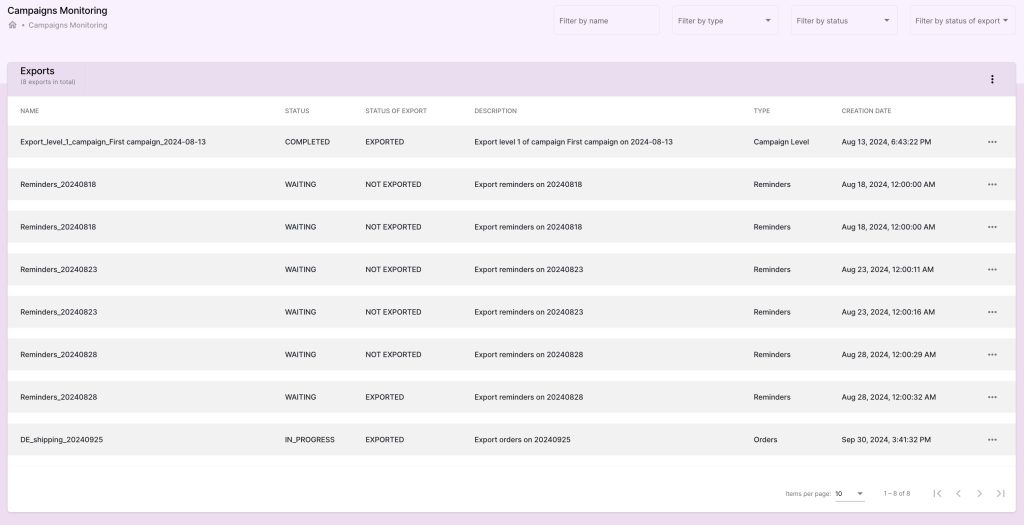
Monitoring Campaign Progression: #
1. Campaign Tracking: #
- When a campaign is launched, a new entry (or line) is added to the campaign monitoring table.
- Each campaign line represents the current status of that campaign, and users can expand the line to view detailed steps involved in the logistics services.
2. Viewing Logistic Service Steps: #
Expanding the Campaign Line:
- Click on the campaign’s line to expand it and view its detailed progression.
- Each step in the logistics process is listed as a separate entry.
Status of Each Step:
- Each logistics step will display its current status, which can be one of the following:
- Waiting: The step has not yet started.
- In Progress: The step is actively being processed.
- Completed: The step has been finished.
- Each logistics step will display its current status, which can be one of the following:
Campaign Completion:
- Once all the logistics service steps are marked as Completed, the campaign itself will be marked as Completed.
- Users can quickly identify campaigns that are fully processed versus those still in progress.

Order Monitoring:
1. Monitoring Order Progression: #
- Similar to campaigns, orders are tracked as they move through various steps.
- Each order line corresponds to the steps defined in the Order Steps settings, which may include stages like Order Review, Item Picking, Packing, and Shipping.
2. Viewing Order Steps: #
- Click on the order’s line to expand it and view its detailed steps.
- Each step will have a status, reflecting whether it is waiting, in progress, or completed.
3. Order Completion: #
- Once all the order steps have been completed, the order will be marked as Completed in the monitoring section.

Reminder Monitoring:
1. Monitoring Reminders: #
- Reminders for unpaid invoices or pending payments follow the same structure as campaigns.
- Each reminder has associated steps, which are the same as the steps defined for campaigns.
2. Viewing Reminder Steps: #
- By expanding the reminder line, users can track the progress of reminders sent to subscribers.
- Each step will indicate its current status (waiting, in progress, or completed).
3. Reminder Completion: #
- When all reminder steps have been completed, the reminder will be marked as Completed.

Re-exporting Data:
1. Re-export Button: #
- Each campaign, order, or reminder line includes a Re-export button.
- Users can click this button to re-export the data associated with that line if needed.
Benefits: #
- Real-time Campaign Monitoring: Track the progression of campaigns, orders, and reminders in real-time, ensuring smooth operations and visibility.
- Step-by-step Status Tracking: Detailed steps for each campaign, order, and reminder provide insight into where processes stand, enabling proactive management of any delays or issues.
- Re-export Functionality: The re-export button allows for quick and efficient correction or follow-up actions, ensuring accurate and timely delivery of data.


