MailOrder MailOrder MailOrder MailOrder
  • Home
  • Features
  • Pricing
  • FAQ
  • Contact
Free Trial

Knowledge Base

MailOrder

Popular Search segmentordercampaignmedia

Getting Started

  • Overview
  • First setup

Product Management

  • Product families
  • Pricing profiles
  • Products
  • Packages
  • Medias

Subscribers Management

  • Contact fields
  • Affiliates
  • Subscribers
  • Search contact
  • Feedbacks

Campaign Management

  • Segments
  • Campaigns

Order Management

  • Orders
  • Order creation

Logistics Management

  • Logistic services
  • Payment methods
  • Campaign monitoring
  • Home
  • Docs
  • Subscribers Management
  • Contact fields

Contact fields

Estimated Reading Time: < 1 min read

Description: #

The Contacts Fields section allows you to define and manage the fields used to store information about your subscribers. These fields can be customized based on the information you need to collect, such as contact details, preferences, and behavioral data.
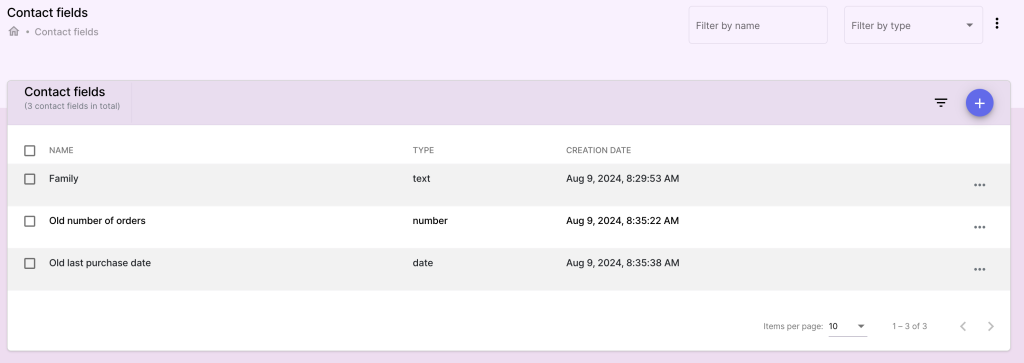
Capture d’écran 2024-10-07 à 23.40.36

Actions: #

Creating and Managing Contact Fields #

  1. Access the Contacts Fields Section:

    • Navigate to the Contacts Fields section from the Subscribers Management menu.
  2. Add a New Contact Field:

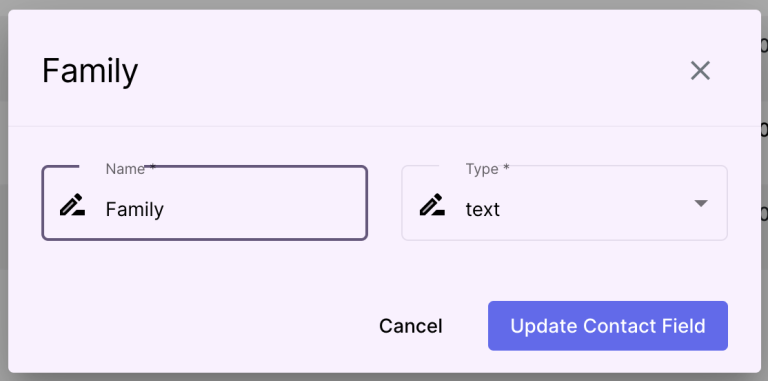
    • Click on Add Contact Field to create a new field.
    • Field Name: Enter a descriptive name for the field (e.g., Birthday, Phone Number, Preferred Language).
    • Field Type: Select the type of data for this field (e.g., text, date, number, dropdown).
  3. Customize Contact Fields:

    • Default Value: (Optional) Set a default value for the field.
    • Required Field: Indicate whether this field is mandatory for all subscribers.
    • Click Save to create the new contact field.
  4. Edit or Delete Contact Fields:

    • To modify an existing field, click on it, make changes, and click Save.
    • To delete a contact field, click Delete and confirm the action.

Note: Removing a contact field will delete the data associated with that field for all subscribers.
Capture d’écran 2024-10-07 à 23.40.50
What are your Feelings
Share This Article :
  • Facebook
  • Twitter
  • LinkedIn
  • Pinterest
Still stuck? How can we help?

How can we help?

Updated on October 7, 2024
Affiliates

Leave a Reply Cancel reply

Your email address will not be published. Required fields are marked *

Summary
  • Description:
  • Actions:
    • Creating and Managing Contact Fields
mailorder-logo-lg


Our expert team is dedicated to supporting you with solutions that are both efficient and high-quality, designed to help you effortlessly manage your orders and provide top-notch service to your clients.


HomeFeaturesPricingFAQContact


© 2026 Website MailOrder by Capoffshore. All rights reserved.

Privacy Policy – Terms & Conditions

MailOrder
  • Home
  • Features
  • Pricing
  • FAQ
  • Contact
Free Trial