Description: #
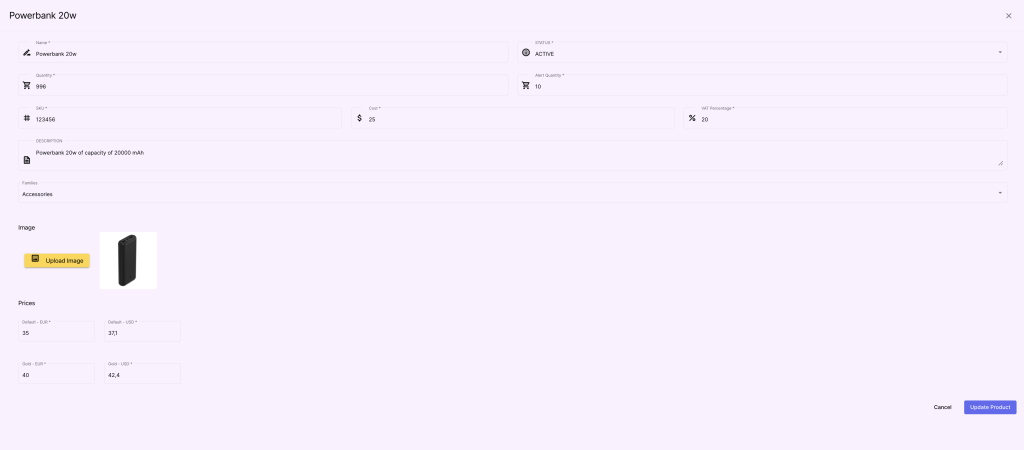
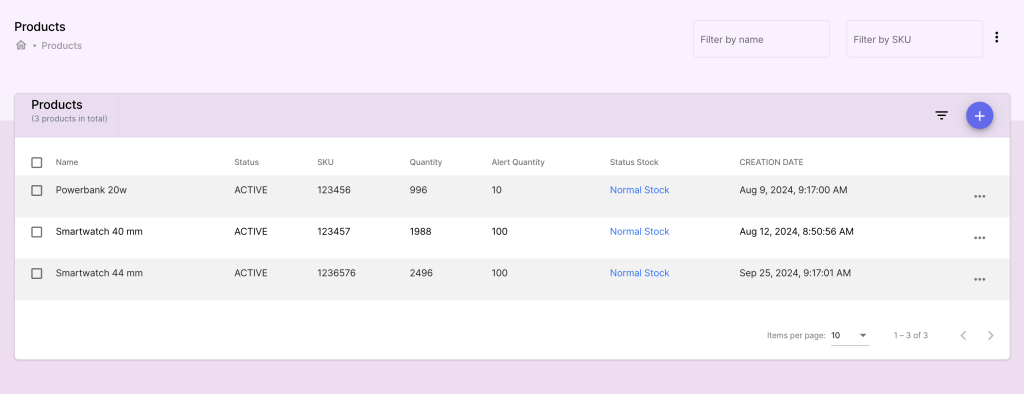
In this section, you can manage your Products, define the inventory and the prices.
Actions: #
Adding a New Product:
- Navigate to the Products menu and click Add Product.
- Fill in product details such as:
- Name: The product’s name.
- SKU: Stock Keeping Unit, a unique identifier for the product.
- Description: A detailed description of the product.
- Price: Set the base price for the product.
- Stock Quantity: Current stock available for the product.
- Stock Alert: Stock threshold to fire an alert.
- Cost: The cost of the product.
- VAT Percentage: The VAT percentage of this product that will be applied in the invoices.
- Families: The list of families that the product belongs to.
- Image: The picture of the product.
- Prices: the prices of the product for each profile and in all currencies.
- Click Save to create the new product.
Modifying an Existing Product:
- Select a product from the list and click Edit.
- Update fields like price, stock, and description.
- Save changes to reflect them in the product catalog.
Deleting a Product:
- Select the product to delete.
- Click the Delete button and confirm the action.